The CompTIA A+ certification is one of the most popular entry-level IT certifications in the world. It covers computer hardware, software, networking, security, and troubleshooting. Because IT is highly technical, professionals use many CompTIA A+ acronyms to simplify communication.
These acronyms appear in exams, help desks, technical support jobs, and real-world IT environments. Understanding them is essential for passing the certification and working in IT support roles.
What Are CompTIA A+ Acronyms?
CompTIA A+ acronyms are shortened forms of technical terms used in computer hardware, networking, operating systems, and cybersecurity.
They are commonly used in:
- IT support jobs
- Help desk troubleshooting
- Computer hardware repair
- Networking configuration
- CompTIA A+ exam questions
For example:
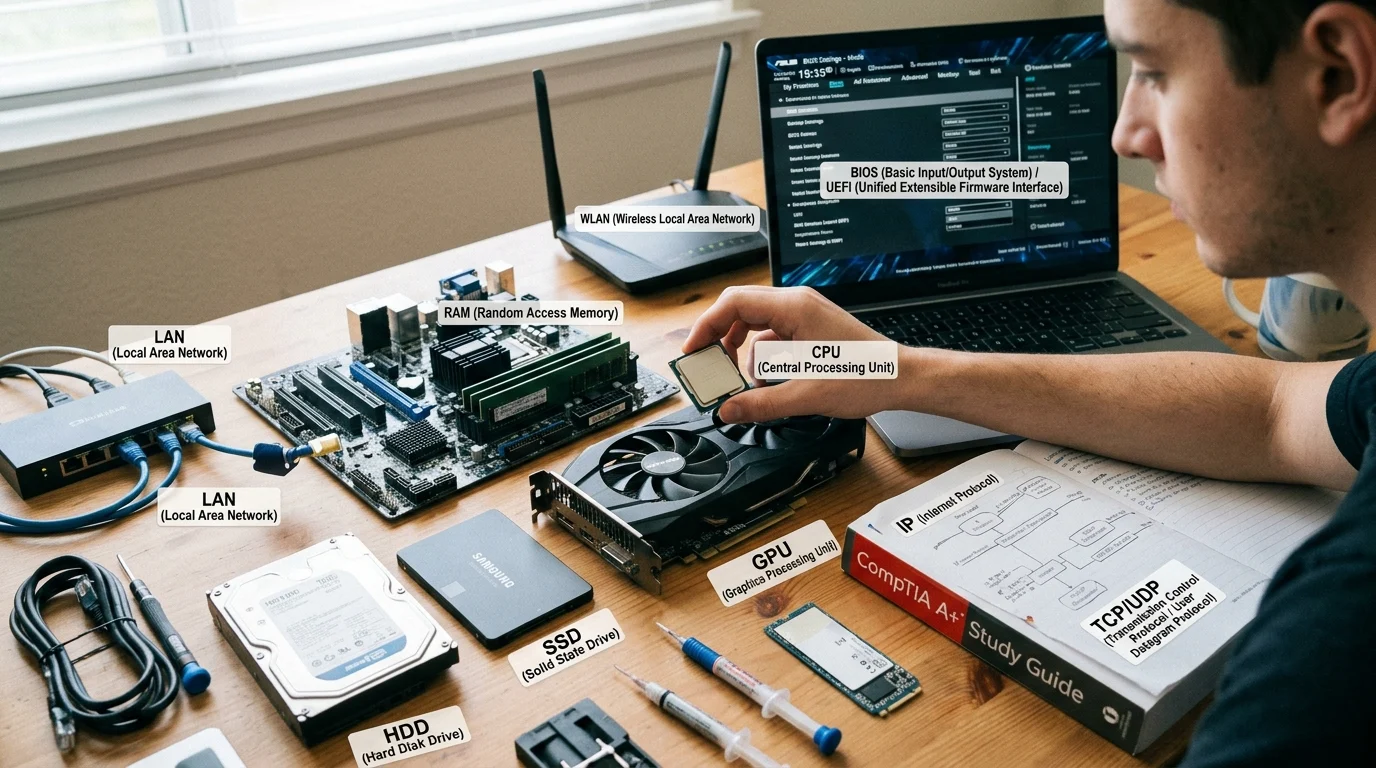
- CPU = Central Processing Unit
- RAM = Random Access Memory
- OS = Operating System
Common CompTIA A+ Acronyms and Meanings
| Acronym | Full Form | Meaning | Usage Context |
|---|---|---|---|
| CPU | Central Processing Unit | Main computer processor | Hardware |
| RAM | Random Access Memory | Temporary memory | Performance |
| ROM | Read-Only Memory | Permanent system memory | Firmware |
| HDD | Hard Disk Drive | Storage device | Hardware |
| SSD | Solid State Drive | Fast storage device | Hardware |
| OS | Operating System | Software managing computer | System software |
| BIOS | Basic Input/Output System | Firmware that starts PC | Boot process |
| UEFI | Unified Extensible Firmware Interface | Modern BIOS system | Boot process |
| NIC | Network Interface Card | Connects computer to network | Networking |
| IP | Internet Protocol | Device addressing system | Networking |
| DHCP | Dynamic Host Configuration Protocol | Assigns IP addresses automatically | Networking |
| DNS | Domain Name System | Converts domain names to IPs | Internet |
| LAN | Local Area Network | Small network (home/office) | Networking |
| WAN | Wide Area Network | Large network (internet) | Networking |
| VPN | Virtual Private Network | Secure connection | Security |
| SSD | Solid State Drive | Fast storage device | Hardware |
| POST | Power-On Self-Test | Hardware check during startup | Boot process |
| PSU | Power Supply Unit | Provides power to computer | Hardware |
| GUI | Graphical User Interface | Visual interface (windows/icons) | Software |
| CLI | Command Line Interface | Text-based interface | Operating system |
Hardware Acronyms in CompTIA A+
CPU (Central Processing Unit)
The brain of the computer that processes all instructions.
RAM (Random Access Memory)
Temporary memory used while programs are running.
HDD vs SSD
- HDD = Older mechanical storage
- SSD = Faster modern storage
PSU (Power Supply Unit)
Provides electricity to all computer components.
Networking Acronyms in CompTIA A+
IP (Internet Protocol)
Used to identify devices on a network.
DNS (Domain Name System)
Converts website names into IP addresses.
DHCP (Dynamic Host Configuration Protocol)
Automatically assigns IP addresses.
LAN vs WAN
- LAN = Small local network
- WAN = Large global network (internet)
Operating System Acronyms
OS (Operating System)
Software that runs and manages the computer.
BIOS / UEFI
- BIOS = Older system startup firmware
- UEFI = Modern version with advanced features
GUI vs CLI
- GUI = Visual interface (Windows, icons)
- CLI = Text commands (Command Prompt, Terminal)
Security Acronyms in CompTIA A+
VPN (Virtual Private Network)
Encrypts internet connection for privacy.
MFA (Multi-Factor Authentication)
Extra security step using multiple verification methods.
ACL (Access Control List)
Controls user permissions on systems.
Why CompTIA A+ Acronyms Are Important
These acronyms are important because they:
- Help IT professionals communicate clearly
- Are required for CompTIA A+ certification exams
- Simplify complex technical terms
- Improve troubleshooting speed
- Standardize IT industry language
Common Mistakes in Learning IT Acronyms
1. Memorizing without understanding
Knowing meaning is more important than just definitions.
2. Confusing similar terms
RAM vs ROM or LAN vs WAN are often mixed up.
3. Ignoring real-world usage
Acronyms are easier to learn when used in practical examples.
Real-Life IT Support Examples
Computer Startup Issue
“Check BIOS settings and run POST diagnostics.”
Network Problem
“Verify DHCP and DNS configuration on LAN.”
Security Setup
“Enable VPN and MFA for secure access.”
Simple Memory Guide
- CPU = Brain of computer
- RAM = Temporary memory
- HDD/SSD = Storage
- OS = Operating system
- IP = Network address
- DNS = Website lookup system
- DHCP = Auto IP assignment
Final Summary
CompTIA A+ acronyms are essential for understanding computer hardware, networking, and IT support systems. From CPU and RAM to DNS, DHCP, and VPN, these terms are used daily in IT environments and are critical for passing the CompTIA A+ certification.
Learning these acronyms helps beginners build strong technical knowledge and prepares them for real-world IT troubleshooting and support roles.